

Loading
  • Link to Youtube
  • Link to Instagram
  • Link to Reddit
  • English English English en
  • Français Français French fr
DJUCED
  • HOME
  • HELP
    • DJ Academy Tutorials
    • Knowledge Base
    • Release Notes
    • User Manual
    • Download Archives
  • PRODUCTS
    • DJUCED
    • DJUCED PRO
    • DJUCED PRO+
    • Hardware
  • DOWNLOAD
  • TRY DJUCED PRO
  • FREE CONTENT
    • DJ Academy Tutorials
    • Hercules official music
  • Menu Menu

HOW CAN WE HELP YOU ?

General Information

  • DJUCED required computers specifications
  • Stems 2.0 with DJUCED 6.2
  • What is AVX, and why does DJUCED require a processor with AVX support. (error 0xc0000142)
  • macOS privacy settings : authorize DJUCED to access some folders is required
  • Apple Silicon Processors – Compatibility News
  • macOS 26 Tahoe compatibility info
  • Microsoft Windows 11 compatibility info
  • Information about compatibility with streaming services.

Getting Started

  • Installing DJUCED
  • Installing Drivers for your Hercules DJ Controller
  • User Manual
  • Managing your DJUCED music library
  • How to access the Integrated Manual
  • DJUCED unlocks mode explained

Learning & Guides

  • How to use Linear and Dynamic beat grids
  • Master Headroom and Limiter explained
  • Managing your DJUCED music library
  • Optimise your computer for djing
  • How to access the DJ Academy with your browser
  • Guide to using Djuced Multilayer Samplers
  • DJUCED GUIDE | rekordbox xml import and export feature
  • How to use DJUCED second master audio output?
  • How to live stream your DJUCED DJ Sets

DJUCED PRO / PRO+

  • What is DJUCED PRO ?
  • What is DJUCED PRO+ ?
  • How to activate a DJUCED PRO redeem license code
  • DJUCED GUIDE | rekordbox xml import and export feature
  • How do I activate my PRO or PRO+ license inside DJUCED ?
  • DJUCED PRO GUIDE | MIDI Mapper documentation
  • DJUCED PRO GUIDE | VJING VIDEO LOOPS GUIDE

Controllers

  • Hercules DJControl Inpulse 200 MK3 (2026) – Mapping and Manual
  • Hercules DJControl Inpulse T7 – Mapping and Manual
  • Hercules DJControl Inpulse 500 – Mapping and Manual
  • Hercules DJControl Inpulse 300 MK2 (2023) – Mapping and Manual
  • Hercules DJControl Inpulse 300 – Mapping and Manual
  • Hercules DJControl Inpulse 200 MK2 (2023) – Mapping and Manual
  • Hercules DJControl Inpulse 200 – Mapping and Manual
  • Hercules P32DJ – Mapping and Manual

Troubleshooting

  • I feel audio latency or hear crackles on my PC, how can I fix it? Use ASIO and appropriate sample rate.
  • macOS privacy settings : authorize DJUCED to access some folders is required
  • Stems 2.0 with DJUCED 6.2
  • What is AVX, and why does DJUCED require a processor with AVX support. (error 0xc0000142)
  • General
    • How to reset audio settings to default
    • How to Reset the Audio Library and Playlists
    • My MacBook is hot when I use DJUCED, what can I do?
    • I can’t set my HOT CUE POINT where I want. Why?
    • How to install and/or Use a secondary Controller mapping in DJUCED
    • Information about compatibility with streaming services.
    • I had an unexpected crash when using DJUCED, what can I do ?
    • Stems 2.0 with DJUCED 6.2
    • What is AVX, and why does DJUCED require a processor with AVX support. (error 0xc0000142)
    • My M4A and AAC files volume are too low on Windows 11 (update 22H2), what can I do ?
    • macOS privacy settings : authorize DJUCED to access some folders is required
    • How to reset all DJUCED settings to default
  • Audio
    • How to reset audio settings to default
    • I have no sound in my Headphones, what can I do?
    • I feel audio latency or hear crackles on my PC, how can I fix it? Use ASIO and appropriate sample rate.
    • I can’t hear some effects in my headphones. Why? – Post-Fader effects explained
    • I can hear the preview/headphones audio into the master of my controller on Windows 10 / 11, what can I do?
    • My M4A and AAC files volume are too low on Windows 11 (update 22H2), what can I do ?
    • How to record your microphone with the Inpulse 500 in DJUCED
  • Latency / Performance
    • I feel audio latency or hear crackles on my PC, how can I fix it? Use ASIO and appropriate sample rate.
    • DJUCED is slow or freezes on my computer, why?
    • DJUCED is stuck on the splash screen, what can I do?
    • I had an unexpected crash when using DJUCED, what can I do ?
    • Stems 2.0 with DJUCED 6.2
  • Library / Analysis
    • How to use Linear and Dynamic beat grids
    • Managing your DJUCED music library
    • How to Reset the Audio Library and Playlists
    • My recording files are not saved, what can i do?
    • My analysis – grid – bpm – hot cue are not saved ? Why ?
    • I can’t set my HOT CUE POINT where I want. Why?
    • How to clean my library ? – remove missing files or duplicates in the Song Library
    • How to migrate your DJUCED Library, playlists, and preferences from one computer to another
    • No audio files can be loaded into a DJUCED deck on my Windows PC, why?
    • How to download Copyright Free music and samples within DJUCED?

Streaming Services

  • Can I use Apple Music with DJUCED ?
  • Information about compatibility with streaming services.
  • Can I use Spotify with DJUCED ?
  • Beatport Streaming- Information and Troubleshooting
  • Beatsource Streaming- Information and Troubleshooting
  • SoundCloud Go+ – Information and Troubleshooting
  • Tidal – Information and Troubleshooting
  • Migrate your streaming services playlist with TuneMyMusic
  • [ended] Qobuz – Information and Troubleshooting
View Categories
  • Home
  • DJUCED Knowledge Base
  • Learning & Guides
  • How to use Linear and Dynamic beat grids

How to use Linear and Dynamic beat grids

Introduction #

Since DJUCED 6.6, a new beat detection technology has been deployed.

This offers :

  1. Faster analysis for BPM and grid
  2. More accurate first beat detection
  3. BPM and grid detection on drumless music.
  4. Accurate BPM and grid detection for music that is not linear in rhythm.
  5. Makes the beatmatch guides more accurate on compatible hardware


We know at DJUCED that since the era of digital DJing, setting a beat grid on a song that was not recorded on a daw is a pain.

Some users are using 3rd parties digital audio workstation to “put the songs on grid” and make edits.
Some users are using dynamic analysis in their DJ software, but they are rarely satisfied with the results. (this is why we never made this happen on DJUCED before – the technology was not ready and not accurate enough).
Some users are manually putting the beat grid, beat by beat, on their DJ Software, with the risks of loosing all the work when changing computer.

We are happy to introduce you to the brand new beat grid Linear and Dynamic modes.

Linear mode #

Linear mode is the default analysis mode.

As the name suggests it, in this mode, DJUCED analyse the song to find only one BPM value that will be applied to the whole song.

So, the beat grid will be linear, also called straight.

This is the mode used by default in most of DJs software and hardware, as most of the music mixed by professional DJs are straight to the grid.

Dynamic mode #

Dynamic mode is a mode that you choose to apply to a particular song.

This mode will make an enhanced analysis of your song, to follow the tempo changes of the song.

It works with :

  1. Tempo variations due to a live drummer/band.
  2. Small tempo fluctuations in music digitalised from a tape, cassette or vinyl.
  3. Large or instant tempo changes that are part of the song’s arrangement.

Change a song’s beat grid to Dynamic mode #

Load the song into a deck.

Open the new beat grid edit mode by clicking on the deck number menu => Edit beat grid

Change “Linear” to “Dynamic” in the menu.

DJUCED analyses the song again and apply the beat grid changes automatically.

What Dynamic mode really does to your song #

Dynamic mode will automatically find the tempo changes, and apply them on your beat grid.

So, if the beat grid has different values, it is logical that the BPM displayed on the screen also changes.

To prevent the BPM from changing frequently or continuously DJUCED will refresh the displayed BPM on screen :

  1. Only on the first beat of a bar.
  2. Only if the tempo variation is significantly important.

Using SYNC with Dynamic grid #

Mixing with SYNC and Dynamic grid is available.

If your master deck has a song with dynamic tempo the slave deck will adjust its pitchfader value to match the BPM changes. Additionally, it will re-sync the grid if necessary during tempo shifts.

If your master deck has a song with a linear tempo and your slave deck has a dynamic tempo, the slave deck will adjust the pitchfader to match the linear tempo and re-sync the grid if needed.

Simplified beat grid editor #

As the new BPM and grid detection is now more accurate, we also redesigned the beat grid editor to make it more simple to use.
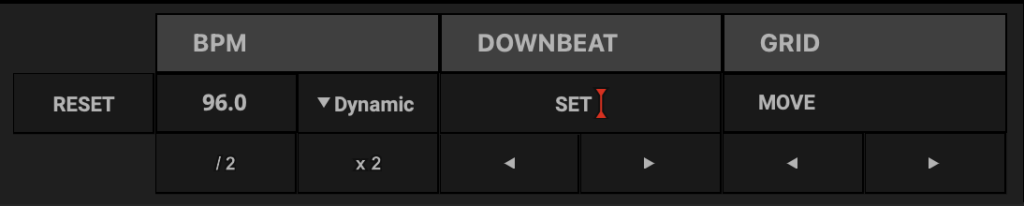
It is now made into 3 main parts.

  1. BPM : manually enter a BPM value, divide or Multiply the BPM value by 2, or set Linear/Dynamic mode.
  2. DOWNBEAT : use set button to put the first beat, or use the buttons to shift the downbeat on the grid, without moving the grid itself.
  3. GRID : click or stay clicked on the move buttons to shift the whole grid left or right.

FAQ #

My previous analysed music is linear, should I analyse it again ? #

It is not mandatory. But we recommend to do it, because some very old analysis can lead, sometimes, of some bugs.

To re-analyse several songs, select them in your library, right-click and choose “Analyse => BPM”.
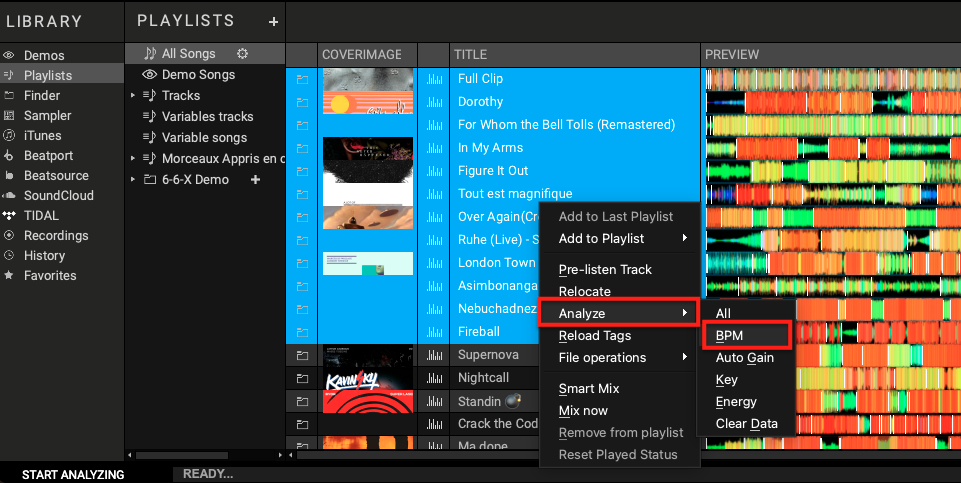
My tracks do not sync properly, or sync no longer works as before, what should I do?  #

It is possible that older analysis are not compatible with the new grids.

Right-click on the song that are not working in your library, choose “Analyse => BPM”.

DJUCED will only analyse and apply the BPM, Grid and first beat.

Some of my songs have the grid shifted when I load them, why?  #

We found that in rare cases, songs analyzed with old versions of DJUCED and in certain formats (especially .m4a on Windows) may have this problem of wrong first beat.

Re-analyze only the BPM of the song to update the analysis of the song and solve the issue.

I applied the Dynamic mode on a piece of music that has very small BPM variations, yet DJUCED doesn’t seem to show them in my deck, why? #

In the case that Dynamic mode detects that a song has multiple very small BPM variations (as with a digitized song from a vinyl, cassette or magnetic tape), DJUCED avoids displaying the BPM changes because it disturbs the DJ and can make him believe a hardware problem.

However, the grid follows its micro variations, so you still benefit from the Dynamic mode.

Why not apply Dynamic mode by defaut? Because if a piece is linear, it shouldn’t be a problem to use Dynamic on it, right? #

In the many tests we have conducted, it seems that technology has its limits.

It is for this reason that grid type detection is not yet 100% automated.

We’re continuing to develop this technology, so the beat grid edits will become a thing of the past.

Apple, macOS, PC, Troubleshooting, Windows
Updated on 19 May 2026
How to live stream your DJUCED DJ SetsMaster Headroom and Limiter explained
Table of Contents
  • Introduction
  • Linear mode
  • Dynamic mode
    • Change a song's beat grid to Dynamic mode
    • What Dynamic mode really does to your song
    • Using SYNC with Dynamic grid
  • Simplified beat grid editor
  • FAQ
    • My previous analysed music is linear, should I analyse it again ?
    • My tracks do not sync properly, or sync no longer works as before, what should I do? 
    • Some of my songs have the grid shifted when I load them, why? 
    • I applied the Dynamic mode on a piece of music that has very small BPM variations, yet DJUCED doesn't seem to show them in my deck, why?
    • Why not apply Dynamic mode by defaut? Because if a piece is linear, it shouldn't be a problem to use Dynamic on it, right?
DJUCED - DJ SOFTWARE BY HERCULES - © 2012-2026. GUILLEMOT CORPORATION S.A. All rights reserved
  • Link to Youtube
  • Link to Instagram
  • Link to Reddit
  • COMPANY
  • TERMINATE YOUR CONTRACT
  • TERM OF USE
  • PRIVACY POLICY
Scroll to top Scroll to top Scroll to top
  • English
  • French